
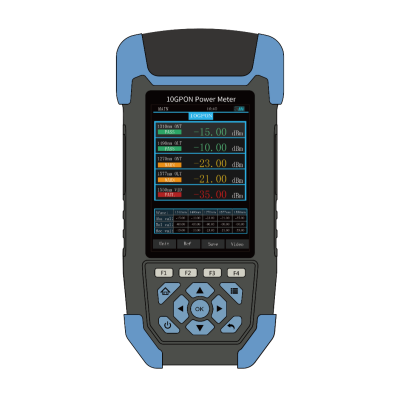
10G PON Power Meter
The 10G PON power meter is suitable for the traditional or next generation PON network testing.
key word:
Category:
Fiber Optics
describe
10G PON
Power Meter
The 10G PON power meter is suitable for the traditional or next generation PON network testing. It can simultaneously measure the voice, data and video signals on 1490nm/1550nm/1577nm (downlink spectrum) and 1270nm/1310nm (burst mode uplink spectrum) optical fiber, the same screen displays the signal power of each of the 5 wavelengths, which enables the maintenance personnel to truly master the power value of the single wavelength optical signal on the line. It is an ideal choice for PON network engineering, construction and maintenance to detect and analyze optical fiber with optional end-face detector and judge whether the signal power is up to the standard by threshold data set by the instrument itself.
Technical Specifications
|
PON Power Meter Mode |
|||||
|
Measuring wavelength |
1270nm |
1310nm |
1490nm |
1550nm |
1577nm |
|
Measuring range(dBm) |
+13~-40 |
+13~-40 |
+13~-50 |
+25~-50 |
+10~-50 |
|
Spectral passband(nm) |
1270±10 |
1310±20 |
1490±10 |
1550±10 |
1577±6 |
|
Insertion loss(dB) |
≤1.5 |
||||
|
Uncertainty (dB) |
≤0.5 |
||||
|
Interface type |
(FC/SC)/APC(optional) |
||||
|
Display resolution(dB) |
0.01 |
||||
|
Threshold settings |
10group |
||||
|
Data storage |
1000 |
||||
|
Standard OPM mode |
|||||
|
Measuring range(dBm) |
+26~-50 |
||||
|
Calibration wavelength(nm) |
850/1300/1310/1490/1550/1625 |
||||
|
Uncertainty (dB)2 |
≤0.5 |
||||
|
VFL |
|||||
|
Wavelength (nm) |
650±10 |
||||
|
Output power(mW) |
10 |
||||
|
Modulation frequency |
Lighting form,1HZ |
||||
|
Others |
|||||
|
Operating temperature (℃) |
-10~+60 |
||||
|
Storage temperature (℃) |
-25~+70 |
||||
|
Relative humidity |
0%~95%RH |
||||
|
Communication interface |
Micro USB |
||||
|
Power supply |
Rechargeable 3.7V lithium battery/Micro USB |
||||
|
Operating time(h) |
Operating time ≥20H,stand-by time ≥60H |
||||
|
Dimension (mm) |
188mm×88mm×44mm |
||||
|
Weight (g) |
400 |
||||
Notes:1、T=23±2℃ test 2、@1550nm,under +26~-30 dBm test
Standard Config
|
NO. |
Name |
Quantity |
|
1 |
Main device |
1pc |
|
2 |
User manual |
1pc |
|
3 |
Certification |
1pc |
|
4 |
Optical interface(FC/SC) |
1pack |
|
5 |
5V power adapter |
1pc |
|
6 |
Micro USB power line |
1pc |
|
7 |
Data CD |
1pc |
Testerinfo


Instructions
Power ON/OFF
After the instrument press“ ”key to start, press“
 ”key about 2s instrument shutdown.
Functional descriptions
After power on, enter the main interface of the instrument function, you can choose to enter the functional interface of the test by up, down, left, right and OK confirmation keys.
10G PONOpticalpowermeter
Detection of ONT1270, ONT 1310nm burst mode uplink signal and OLT/VIDEO 1490/1577/1550nm downlink optical signal power in PON network system.
Under this interface, unit, reference, data record and so on can be used through the F shortcut key at the bottom of the instrument screen.


OPM
For all kinds of equipment and optoelectronic components of the optical signal power testing, insertion loss testing.
VFL
The F shortcut key at the bottom of the instrument screen allows to use functions such as constant brightness, 1 Hz, 2 Hz, and OFF.
6.2.4End face inspection (optional)
The End Face detection module is connected to the Micro USB port on the right side of the instrument. The interface of the instrument can select the end face detection function, and the corresponding function can be selected by the F Shortcut Key.
System setup
Select “System settings” on the main interface to confirm the entry of the instrument screen display system settings of various menu functional information.
Edit PON Threshold: 10 sets of threshold data can be set, through the instrument upper and lower left and right and OK keys for editing confirmation. When the edit option is completed, if the threshold function is selected to “Turn on”, the test data is displayed in three colors on the instrument screen: “Pass is green”, “Warning is yellow”, “Failure is red”.
History: in the test data, when the “Save” button is pressed, the screen interface prompts the data to be saved “Edit name --”, you can select the corresponding character name definition through the key group, and then click the “OK” button to confirm. Save the data in the “History” options can be viewed, delete operations, the upper right-hand corner of the number of saved data records and the total.
Time Setting: you can edit the time setting of the instrument system.
Backlight setting: the brightness of the instrument backlight can be set to save energy and electricity.
DIM backlight: instrument keyboard will not operate for a certain period of time into the backlight dim energy-saving mode.
Automatic shutdown: the instrument can be set a certain time not to operate any key automatically shutdown time.
About the machine: the current version of the instrument and other information.
Data Communication
Run CD, according to the computer system to choose the installation of USB driver softwareCP210x_VCP_Win2K_XP_S2K3.exe。
 或
或
Install the software runtime environmentdotNetFx40_Full_x86_x64.exe。

Connect the instrument to the computer with a USB cable and turn on the software  Selecting the “Connect” button above the communication COM port, and then click “Connect”.
Updatedata
Click the “Chinese” icon, you can switch the software interface language, select the “Upload data” tab, click the “Upload data” button, the instrument stored in the test data read to the computer; Click “Delete test data” or “Clear test data” button to delete data;

Threshold setting
Click “Upload threshold” to upload all the data of threshold set by the instrument;
Click the “Threshold settings” option, can directly in the software to modify the threshold group name, data, edit the changes after clicking the right-click “Settings” can be saved successfully. 
Calibration
After selecting the “Calibration” option in the setup option, PON module and common optical power meter module can be calibrated respectively, and user self-calibration can be carried out by selecting the appropriate wavelength.

Take the example of “Calibration of 1310nm with a common optical power meter”:
Assuming the current 1310nm optical power intensity -10dBm, insert the current line optical signal into the OPM common power meter port, then “Select wavelength 1310nm”and click “Tangent wavelength 1310nm”. The 1310nm wavelength can be calibrated by filling-10dBm in the “Input standard power value-10”text box and clicking the “Calibration” button.
Note: Before the instrument factory has been strict calibration inspection, customers should be careful to use this function to avoid instrument test deviation!
Maintenance
1. The tester shall operate without appreciable vibration.
2. Keep the output end face clean, if there is dirt damage, should turn down the output flange, use dust-free paper or cleaning cloth and anhydrous alcohol for end face cleaning.
Please cover the dustproof cap when the equipment is not in use.
4. Carefully plug in and pull out the light connector.
5. Handle with care to prevent equipment from falling or bumping.
Warranty
We do not suggest user to repair 10G PON tester by themselves.
1. The company will provide a product commitment, warranty period for the date of shipment within 18 months.
2. When purchased products are found to have quality problems during this period, the company will make appropriate repairs or replacement.
3. If the instrument is in use in the process of problems, according to the common fault prompt solution still can’t be solved,
users are not allowed to open the chassis without authorization, please contact our sales staff.
4. The manufacturer is responsible for the free maintenance or replacement of the instrument for quality faults caused by production defects
Ensure that only for the normal use of the instrument, and no damage or improper use of the conditions.
Related products
Get product quotes for free
Contact us
Address: RoomA-1445, Level 6, No.28 Shangdi Information Road, Haidian District, Beijing, PRC.
Postal code: 100085
Tel:+86 10 82771386/2866/3382
Fax:+86 10 82771782
400 hotline: 400 630 3382
Website: www.opwill.com

OPWILL not only serves major domestic operators, equipment manufacturers, private network users and communication service contractors, but also sells to more than 30 countries and regions in the world.
© 2024 OPWILL Technology (Beijing) Co., Ltd